Internal Entity Linking (Internal EL) is a powerful feature within Schema App’s Entity Hub that connects your content to your own defined entities. This document describes what Internal EL is, why it’s valuable, how it works, and how to get started using it.
TABLE OF CONTENTS
- What is Internal Entity Linking?
- What does Internal Entity Linking do?
- How does Internal Entity Linking work?
- Who has access to this feature?
- How is Internal Entity Linking implemented?
- What types can External EL identify?
- How do I know External EL is working?
- General Content Considerations
- External EL Limitations
What is Internal Entity Linking?
Internal Entity Linking (Internal EL) is an automated process that scans your website's text to identify mentions of entities that already exist within your own Schema App project (created via the Editor or Highlighter). When a mention is found, Internal EL automatically embeds a link to that specific entity's unique URI directly into your Schema Markup.
Think of it as an automated "internal linking" system for your knowledge graph. Instead of linking to external authorities like Wikipedia, it links to your own authoritative definitions of your products, services, people, and concepts.
What does Internal Entity Linking do?
Without Internal EL automating this process, you risk creating:
- Duplicate Entities: Your knowledge graph becomes cluttered with many separate entries for the exact same real-world thing.
- A Disconnected Graph: Search engines and AI systems fail to see the connections between your different pieces of content because they aren't linking to a central, shared definitio
- Noisy Data: It becomes difficult to analyze your content coverage accurately because one topic is split across many duplicate entitie
Internal EL solves this by ensuring that every mention of an entity points back to a single, canonical definition in your knowledge graph. This leads to:
- A More Interconnected Knowledge Graph: Entities are densely linked based on their semantic meaning, not just page URLs. This helps search engines understand the relationships between your different assets.
- Fewer Duplicate Entities: It consolidates mentions into a streamlined, accurate knowledge graph, making your data cleaner and more reliable.
- Better Content Analysis & Reporting: It allows you to accurately measure sitewide coverage of specific topics and reveal potential internal linking opportunities between pages for human users.
How does Internal Entity Linking work?
Internal EL works by applying a specialized tag to a Highlighter template.
- Select a block of text on a page (using an XPath).
- Internal EL scans that text and uses Named Entity Recognition (NER) to identify potential entities.
- It then compares those identified entities against your existing Schema App knowledge graph.
- If it finds a match based on the name and distinct properties, it grabs the unique URI (@id) of that existing internal entity.
- It embeds that specific URI into the markup of the current page, creating a semantic link back to your central definition.
As a result, the markup will look something like this:
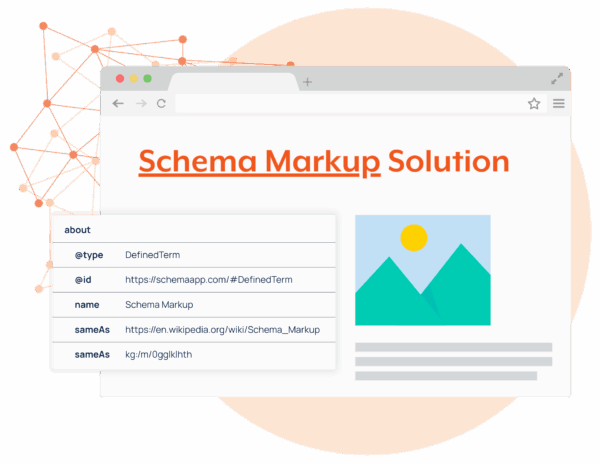
The results are cached for 12 weeks.
Who has access to this feature?
Internal Entity Linking is available to Enterprise accounts with Entity Hub included in their contract. For more information, get in touch with sales@schemaapp.com.
How is Internal Entity Linking implemented?
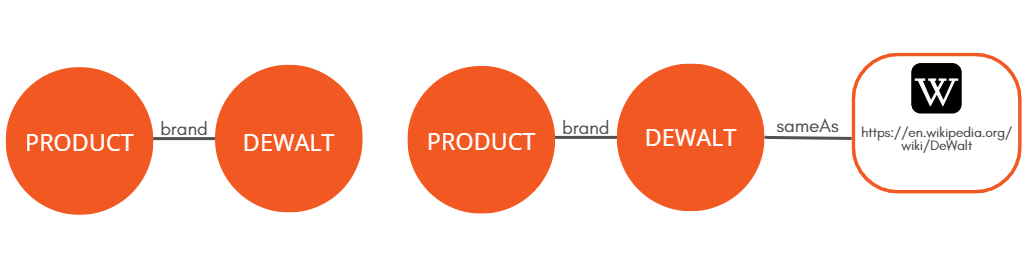
First, you’ll consult with your Customer Success Manager (CSM) to find a page set with content that contains internal entities: people, places, things, or concepts. Then, you and your CSM will decide which schema.org property to use for mapping the returned entities.
If you expect to receive entities of many different types, you'll want to use a property that expects schema.org/Thing so that entities of any type can be added to your content.
Example: if applying to the article body of a BlogPosting, use the mentions property to capture entities of any type.
You can also restrict the results to only one type in order to use more precise properties.
Example: if you want to say a Service has an areaServed, the Internal EL results will need to be restricted to the Place type.
What types can External EL identify?
External EL identifies entities with the following schema.org types:
- Date
- ContactPoint
- CreativeWork
- Event (Thing)
- Number
- Offer
- Organization
- Person
- Place
- PostalAddress
- Product (Thing)
- Thing
Note: The API is able to identify entities typed as Product and Event. However, since these types can be eligible for Rich Results, they trigger errors in Google Search Console. As a result, we have chosen to type Product and Event entities as Thing to prevent errors from appearing in Google Search Console enhancement reports.
How do I know External EL is working?
Once pages have been run through the API, results will begin to populate in the Entity Hub's Entity Reports.
Note: Pages have to be visited in order for External Entity Linking to run. The first page visit will trigger the process to run and entities will be visible within the markup on subsequent page visits.
For more information, see our Entity Reports documentation.
General Content Considerations
1. Use standardized names
When possible, use terms that can be found on authorities like Wikipedia or Wikidata. Provide additional content that includes language familiar to users. This way your content is optimized for both entity SEO and content SEO.
2. Capitalization Is Important!
Proper nouns are differentiated from common nouns with the same name by capitalization. Ensure that proper nouns are consistently capitalized to facilitate External EL matches.
Example: Apple, the “American multinational technology company” and apple, the “fruit of the apple tree”.
3. Consider surrounding content
What other entities are relevant to your primary entity? Take Amazon, for example. When surrounded by other keywords like “technology”, “e-commerce” and “digital streaming”, it is identified as the Amazon the company, whereas keywords such as “tropical”, “trees”, or “biodiversity” make it clear that the entity being mentioned is the Amazon rainforest in Brasil.
This approach isn’t that different from keyword clusters in content SEO. The only difference is that it takes NLP APIs into account alongside human users searching for content.
External EL Limitations
Limitations of API Results
External EL will not return entities if the API lacks any identifying metadata such as a Wikipedia URL or Google Knowledge Graph MID.
The API used for External EL has an accuracy rate of approximately 83%. This means it occasionally matches to entities that are incorrect (for example, matching to Hamilton the person, rather than Hamilton the place).
Use the Entity Manager to edit an entity's properties for improved accuracy or to block entities from deploying to eliminate irrelevant or redundant data.
For more information, see our Entity Manager documentation.
Tag Run Limitations
External EL tags can be run up to 10K times on up to 10K characters per URL. This means one External EL tag can be run on up to 10K URLs, and two External EL tags can be run on up to 5K URLs.
If you're interested in increasing the scope of External EL on your account, you can do so as a monthly add-on.
To start implementing External EL on your account, get in touch with one of our Customer Success Managers at support@schemaapp.com
Was this article helpful?
That’s Great!
Thank you for your feedback
Sorry! We couldn't be helpful
Thank you for your feedback
Feedback sent
We appreciate your effort and will try to fix the article